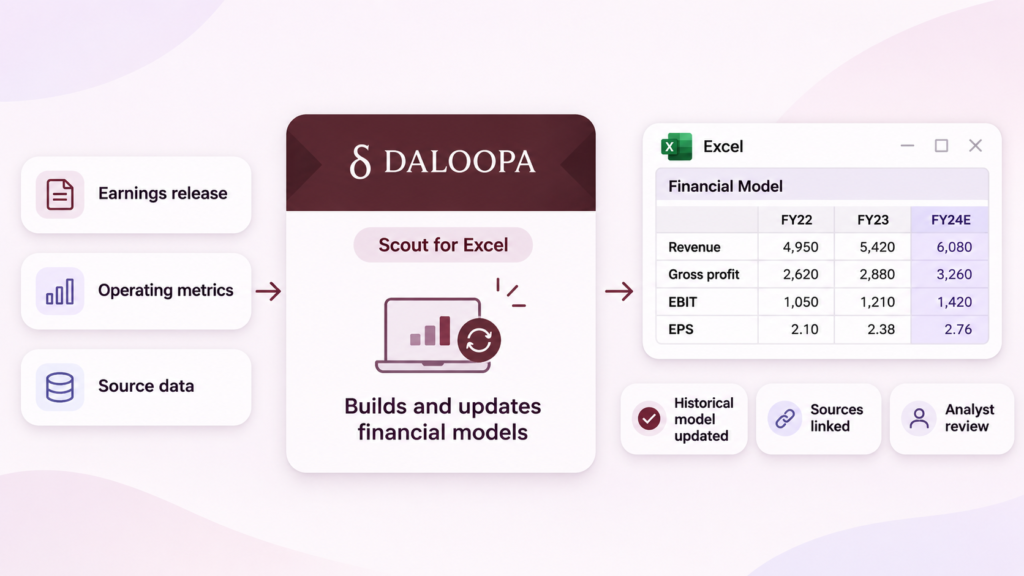
| TL;DR: After a public company reports earnings, analysts must update its financial model before assessing what the results mean. Daloopa’s Scout helps them build and update models through plain-language requests in Excel. It uses Daloopa’s public-company database and links reported figures to their sources, making them easier to check. Analysts review the calculations and decide which assumptions to use for forecasts. The aim is to spend less time preparing spreadsheets and more time understanding the business. |
When a public company reports earnings, an investment analyst has two jobs. One is updating the spreadsheet with the latest results. The other is working out what those results mean for the business.
The first job can delay the second. Each figure has to be found and checked before it goes into the right cell. After all, a number from the wrong reporting period can distort the analysis that follows.
Daloopa’s Scout aims to reduce the time analysts spend on this work. Released to all users in September 2026, the AI agent builds and updates financial models from plain-language requests inside Excel.
Scout’s release raises a practical question for buyers of AI financial modeling software for equity research. How much work can analysts hand off while keeping the model easy to check?
Equity Research Models Need Industry Data Beyond Revenue and Profit
A financial model combines a company’s historical results with an analyst’s forecasts. It helps analysts see how changes in sales or costs could affect future profits and the company’s valuation.
Analysts need to update these models whenever new information becomes available. The challenge grows when they cover several companies, as each reports earnings at different times and tracks different operating metrics.
Revenue and profit tell only part of the story. Each industry has its own metrics that analysts use to assess business performance. A retail analyst watches same-store sales, for example, while a software analyst focuses on recurring revenue. Daloopa says its database covers thousands of operating metrics and contains 4 to 10 times more data points per company than other providers.
This is where Scout puts that data to work for analysts who cover public companies. Daloopa says the agent can build a model from scratch or add a new quarter to an existing one. It can also compare companies in the same industry, accounting for differences in their reporting periods and financial metrics.
Scout Updates A Model From A Plain-Language Request
Consider an analyst covering a retailer. The morning after its earnings announcement, they open the company’s existing Excel model, which contains historical results and forecasts for future quarters.
The analyst needs to add the latest figures without changing the assumptions behind existing forecasts. To do that, the tool must understand both the new data and the structure of the existing spreadsheet.
Scout handles this type of update through a set of default settings. It automatically builds historical columns but adds forecast columns only when the analyst requests them. That way, the analyst retains control over the assumptions behind future projections. Before making changes, Scout presents a plan for the analyst to review. The analyst can check the figures, reporting periods, and proposed changes before approving them.
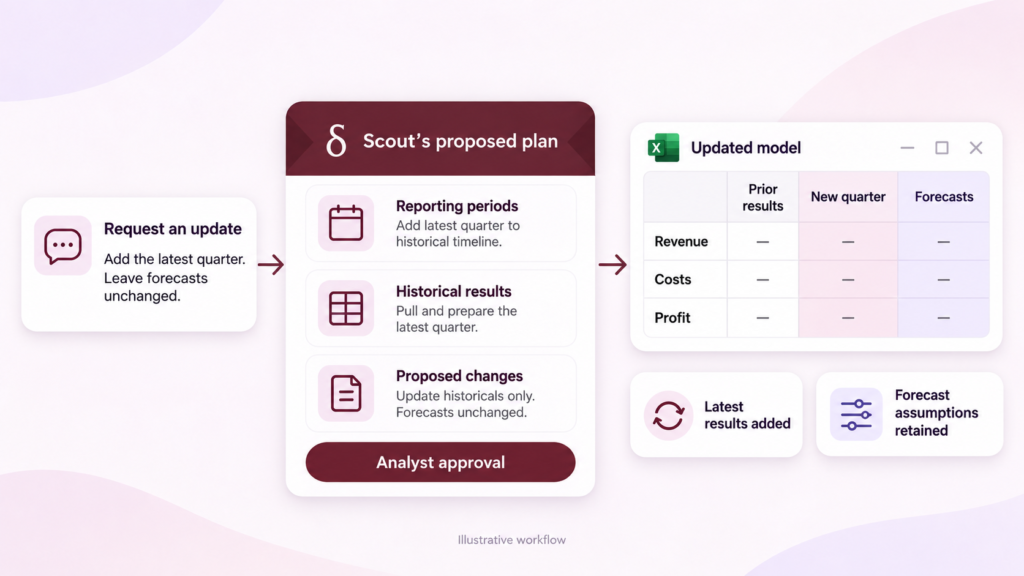
Since analysts repeat this process every quarter, they can save their instructions as a custom Skill and reuse them for future updates. Default settings help maintain consistent formatting, while chat history lets analysts revisit previous sessions when needed. For AI financial modeling in Excel, that turns a one-off request into a quarterly routine.
Why the Source Behind A Number Matters
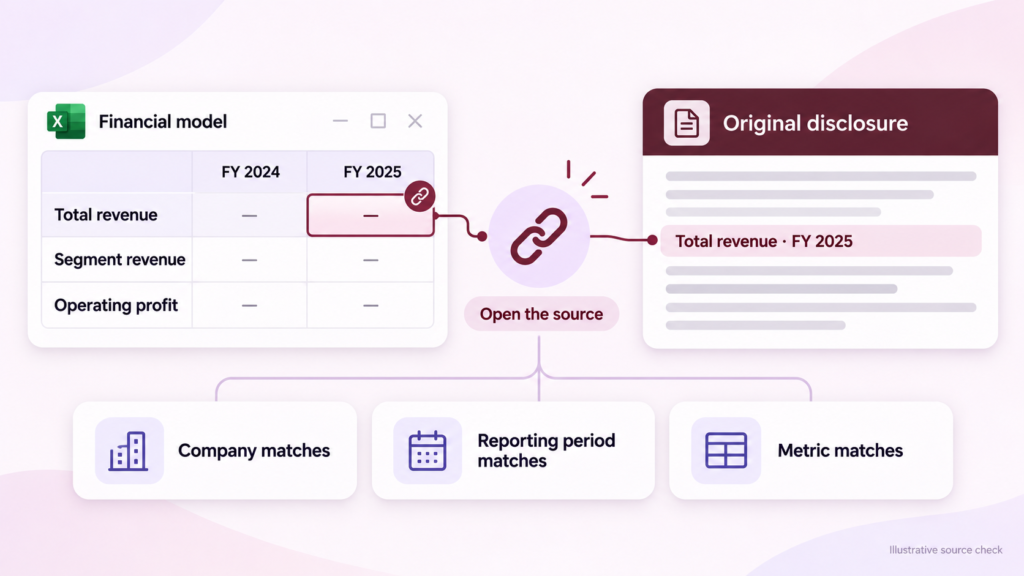
Every figure Scout pulls in comes from Daloopa’s database covering more than 6,000 public companies. According to Daloopa, each one links back to its original source.
So, when a figure looks unusual or differs from previous reports, the analyst can open its source disclosure and verify where it came from and which reporting period it covers.
Payroll AI faces a similar accuracy problem. Symmetry connects AI agents to a dedicated tax engine, so the model can interpret the request while the underlying calculation comes from a system built specifically for payroll tax.
The quality of the underlying financial data also affects how accurately AI models retrieve information. The company tested three general-purpose AI models, including Claude and Gemini, on 500 questions.
Each question required the model to retrieve a specific financial figure. When using information from the open web, the models retrieved the correct figures in 20% to 71% of cases. Using Daloopa’s database, their accuracy increased to between 89% and 91%.
But here’s the catch. Retrieving an actual reported figure doesn’t always mean the model has retrieved the right one. Among the top-performing models, 63% of the remaining errors involved reporting-period confusion, such as misreading a fiscal year label. Another 20% came from retrieving the wrong figure, such as segment revenue instead of total company revenue.
This can be particularly challenging in retail, where companies don’t always follow the same fiscal calendar. Many retailers, for example, have fiscal years that end in January. They may also use different labels for those reporting periods. Source links help analysts verify the correct period before adding a figure to their models.
Correct Inputs Still Need Working Calculations
Getting the right numbers into Excel is only half the job. The calculations built on them have to work, and the resulting model should be easy for another analyst to follow.
Getting these calculations right remains a challenge for AI agents. In a study updated in August 2026, the researchers behind MBABench tested more than 18 AI agents on finance spreadsheet tasks. Even the strongest fell short of basic professional standards. Performance declined sharply when tasks required several linked calculations rather than a single calculation.
To help users catch errors, Daloopa recommends that Scout users review the model at each stage. Users are advised to verify that subtotals are correct and that each column contains figures from the intended reporting period. It also recommends splitting large jobs into smaller requests. This allows analysts to review intermediate results instead of waiting until the entire model is complete.
The same review step appears elsewhere in finance AI. Datarails Desk uses connected financial records to prepare answers, but employees still check that the records support the response before it goes out.
Buyers Can Reach Daloopa’s Data Through Scout or Other AI Tools
Buyers can access Daloopa’s data through its own products, including Scout and its Excel add-in, or through third-party AI platforms that integrate with its database.
Anthropic offers one example through Claude. When Anthropic introduced its finance agents in May 2026, it listed Daloopa among the market data sources Claude connects to. Among them is a financial modeling agent that builds models using company filings and financial data feeds.
This means both Anthropic’s modeling agent and Daloopa’s Scout can draw on the same financial data. The choice depends on whether buyers need access to financial data or want an AI tool to handle more of the modeling process. A fund developing its own research tools may only need access to the data. An analyst looking to automate spreadsheet work directly in Excel may find Scout more relevant.
The Best Way to Test Scout is On A Model You Already Know
A good evaluation starts with a company the research team already knows well. Their existing model gives them a clear reference for judging Scout’s changes.”
For a more demanding test, they can ask Scout to add the latest quarter’s results or compare the company with others in its industry. A company that recently reorganized its business segments makes a tougher test, since older and newer figures no longer line up neatly. Analysts can then check whether Scout uses the correct reporting periods, produces accurate calculations, and requires extensive corrections.
Before testing Scout, buyers should check whether Daloopa covers the companies and operating metrics they regularly track. During a demo, buyers should ask Scout to work with an existing workbook and check whether it preserves the spreadsheet’s structure and formatting. They should also test what happens when data is missing or a request can’t be completed. Access controls and data-handling terms for their workbooks deserve the same scrutiny.
Regardless of what Scout generates, analysts remain responsible for their forecasts, assumptions, and investment decisions. Good Equity research model automation should reduce the work involved in building and checking a financial model without compromising its accuracy.
Faster builds help, but review time counts too. Ultimately, Scout’s bet is that review gets shorter when every figure carries its own source. As analysts hand more spreadsheet work to AI, the edge may go to tools that speed up checking, not just building.