| TL;DR: Law firms have more AI tools to choose from than ever. But before any of them can answer a useful question about a case, they need to know which information belongs to it. We interviewed Thompson Blankinship from the LawToolBox to understand why that older problem has suddenly become much more important. |
In 2005, lawyers challenging Fresno’s approval of a proposed 12-acre commercial development had 90 days to request a hearing. They filed on day 91.
When the case later reached the California Court of Appeal, the court record showed how the deadline may have gone wrong: when the date was first entered on the calendar, October appears to have been counted as having 30 days instead of 31. The error was discovered before the deadline expired, but the lawyers believed there was no longer enough time to file that day. The petition was eventually dismissed.
The Fresno case came years after legal teams had begun using software to reduce this kind of calendaring risk. LawToolBox entered that market in 1998 with rules-based deadline software. Rather than asking someone to calculate every date manually, the system could take an event in a case, apply the relevant court rules, and calculate the deadlines that followed.
What lawyers now expect software to understand extends far beyond a deadline.
A case can generate years of filings, emails, meetings, deadlines, research, notes, and decisions. AI assistants can now work across some of that record too. But a case is not simply a collection of files.
LawToolBox had already started moving beyond calendaring by 2016, when it was organizing deadlines and other work around individual legal matters inside Microsoft 365. At the time, this gave the people working on a case a way to organize more of its information around the matter itself.
Years later, that earlier way of organizing legal work became relevant for a very different kind of software.
We spoke with Thompson Blankinship, Marketing Manager at LawToolBox, about how software that started with court deadlines ended up working on a problem now sitting much closer to the center of legal AI: how software knows enough about a matter to work with it.
When the Deadline Became Part of the Matter
Calculating the 90-day deadline would have answered one question in the Fresno case. The lawyers handling the dispute still had an entire case to manage around it.
That work could include the filings already made, documents related to the development, emails between the people handling the case, discussions about strategy, future court dates, and the decisions made as the challenge progressed.
As more legal work moved into software, those records were often stored according to the application being used rather than the case they belonged to.
An email could sit in Outlook while the document it referred to lived in SharePoint. A discussion could happen in Teams. The deadline would appear on a calendar. The lawyer working on the case knew those pieces belonged together, even though they were stored in different places.
The software holding each piece did not automatically have that understanding.
This is where LawToolBox began moving from calendaring into what legal technology calls matter-centricity. A matter is simply the legal work being handled, such as a lawsuit, transaction, or investigation. Instead of making the lawyer think first about which application contains something, a matter-centric system tries to organize the work around the case it belongs to.
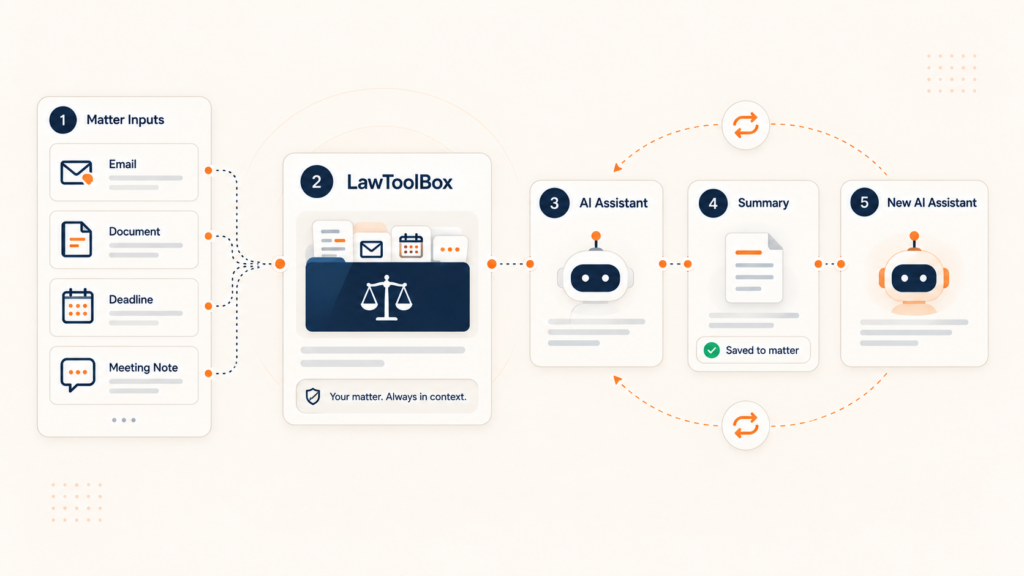
LawToolBox now uses Microsoft 365 to bring deadlines, documents, emails, and collaboration around an individual legal matter. The company refers to that workspace as a matter container.
Blankinship described the company’s move in broader terms. “What has never changed is that legal professionals need confidence in their work product,” she told SaaSTake. “Whether it’s a court deadline, a client communication, or an AI-generated insight, attorneys need information they can trust.”
With deadline software, getting the rule and the resulting date right was central to whether a lawyer could trust the result. As LawToolBox began organizing more of the case around the matter, there was more for the software to keep straight: which emails, documents, calendars, and conversations belonged to the same legal work.
In 2016, those connections were primarily useful to the people handling the matter.
Generative AI later gave them another purpose.
AI Can Read the Firm’s Files. It Still Has to Know Which Ones Matter.
A general-purpose AI model does not need to know anything about a particular law firm to explain a legal concept.
Ask it what happened on one of that firm’s cases yesterday, and the situation is different. The answer could be in an email sent that morning, a filing from six months ago, notes from a meeting, or a deadline that moved last week.
The AI cannot get any of that from its general knowledge. Someone has to give it access to the firm’s own information. And access alone does not solve the problem.
The same issue appears when employees use AI for business planning. Market Logic’s DeepSights MCP connects AI assistants to company research while limiting what they can retrieve to information the signed-in employee is allowed to access.
Moreover, we ran into a similar issue while reporting on Law In Order’s use of AI in document review. There, AI could work through thousands of documents quickly, but the legal team still had to explain what the case was about, which issues mattered, and what the system should look for. A document does not become relevant simply because a model can read it.
The same principle applies here before the AI even begins analyzing anything.
If a lawyer asks about a deadline on Client A’s case, the useful answer may depend on Client A’s filings, emails, and meetings. Information from Client B’s unrelated matter may be completely irrelevant, even if it contains similar words.
There is also information the lawyer may not be allowed to see at all.
Microsoft says Microsoft 365 Copilot can use organizational information such as files, emails, meetings, and calendars when responding to a user. But the system does not give that user new access simply because the request came through AI. Existing permissions still determine what information Copilot can use.
So when Blankinship talks about AI being “matter-aware,” the phrase describes something fairly practical. The software needs to know which case is being discussed, where the relevant information sits, and which of that information the person asking is allowed to use.
“When AI operates without matter-specific context, it creates uncertainty,” Blankinship told SaaSTake.
LawToolBox has since built integrations that let Copilot work with information held around its Microsoft 365 matters. The company also says it was the first legal application to receive Microsoft’s “Works with Copilot” approval in December 2023.
Blankinship said the work involved technical, security, governance, and compliance requirements. But when we asked what LawToolBox learned from the process, she returned to the information underneath the AI.
“What we learned is that AI becomes truly useful for legal professionals only when it’s matter-aware,” she said.
Once firms can give AI the right matter context, another decision follows: which AI should they give it to?
Firms Keep Asking Which AI to Choose
At a recent legal-industry event in Nashville, Blankinship said one question kept coming up from law firms: which AI platform should they commit to?
The concern makes sense. A firm may be considering Microsoft Copilot today while also evaluating general-purpose or legal-specific AI products. The available tools are changing quickly, and choosing one does not mean the rest of the adoption problem disappears.
We saw that while reporting on Harbor’s work with firms adopting legal AI, one firm had already tested and rolled out an AI product before running into problems that included an incompatibility with its case-management system.
Blankinship thinks firms should pay attention to something that may last longer than the model they choose.
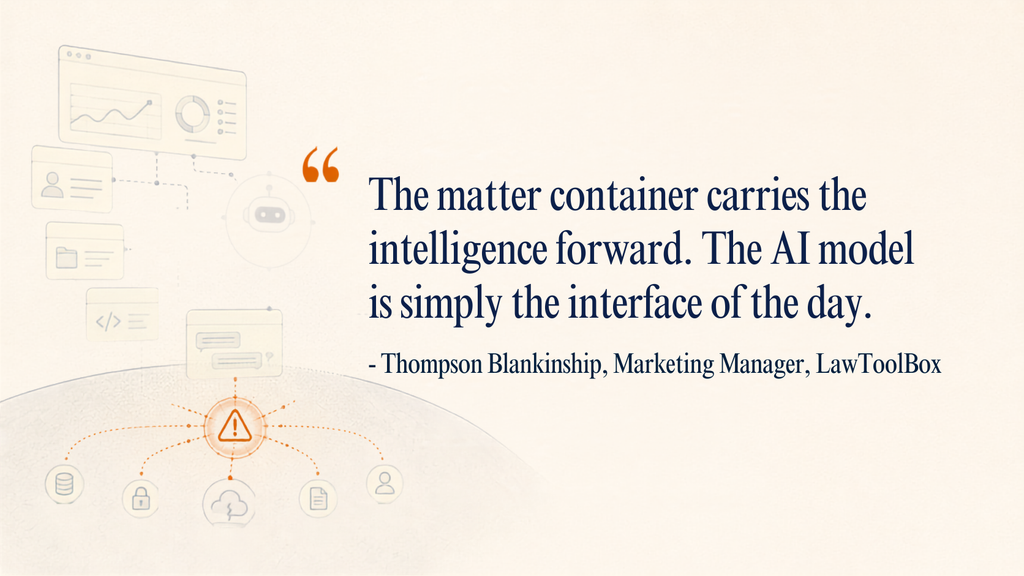
Blankinship is using “intelligence” to describe the matter knowledge being carried forward, rather than suggesting that the container itself learns.
A legal matter can remain active for years. During that time, it may collect filings, emails, court dates, meeting notes, research, client instructions, and decisions made by several different people.
The firm’s AI choices may change much faster.
LawToolBox is now using Model Context Protocol, commonly called MCP, as one way to separate those two things.
For reference, Anthropic introduced MCP in 2024 as an open standard for connecting AI applications with outside tools and sources of information. Put simply, MCP gives compatible AI tools a standard way to connect with information stored in other systems. Without something like that, each AI product may need its own separate connection to each source it needs to use.
LawToolBox’s MCP connector applies that idea to the Microsoft 365 environments it creates around legal matters. Its documentation says compatible systems, including Copilot Studio and Claude, can reach matter information while the firm’s existing Microsoft 365 permissions and governance continue to apply. Payroll is starting to confront the same access question. Symmetry is using MCP to give agents access to payroll-tax calculations while keeping the underlying payroll record read-only.
That does not make one AI product equivalent to another. A firm may still prefer one model because of its capabilities, security requirements, price, or the work lawyers want to do with it. It does, however, separate two decisions that can easily get mixed together.
One is which AI the firm wants to use. The other is where the information that AI needs should live. Those decisions do not necessarily have the same lifespan. The model can change faster than the matter.
So far, that solves for information moving from the matter into whichever AI the firm chooses. Lawyers are also beginning to send useful work the other way.
What Happens to Useful Work After the Chat Closes?
A lawyer might ask an AI assistant to review several documents and summarize an issue. The first response generated by the AI tool may need correcting. The lawyer checks the sources, changes part of the analysis, adds something the system missed, and eventually produces work they want to use.
Then the chat closes.
If that analysis stays only inside the AI conversation, another lawyer joining the case six months later may never know it was done.
We found a related problem while reporting on Epona’s approach to legal knowledge management. Making a firm’s old work easier to search does not make every document equally useful. Someone still has to decide what deserves to be treated as knowledge worth carrying forward.
LawToolBox is dealing with that question inside the individual matter.
Its MCP documentation says matter containers can include AI insights saved from Microsoft 365 Copilot work alongside documents, deadlines, meeting transcripts, and the legal team’s own analysis.
Blankinship described this as the matter container getting “smarter” for the next person. The container is not learning by itself, and saving an AI-generated answer does not make it correct or guarantee that another AI system will use it later.
LawToolBox’s approach gives that work somewhere else to go.
If a lawyer decides that a piece of research, a summary, or some AI-assisted analysis deserves to stay with the case, it can be stored with the matter rather than left inside an individual chat history. Months later, another lawyer can find that work as part of the case record.
That question of carrying legal work forward also appears in arbitration research. Jus Mundi is looking at how firms could reuse past submissions and strategic notes when lawyers begin work on a new dispute.
The Matter May Outlast the AI
If useful AI-assisted work is going to stay with the case, the bigger question is what happens when the firm changes the AI itself.
At Nashville, firms were asking Blankinship which AI they should choose. But that may be a decision they make more than once. Models, products, and vendors can change much faster than a legal matter, which may remain active for years.
What needs to last is the context around that matter: the filings, emails, deadlines, meetings, decisions, and useful work created along the way. LawToolBox’s approach is to keep that information organized around the matter rather than around whichever AI happens to be using it.
That shifts the longer-term question for law firms. Choosing the right AI still matters. But so does making sure the knowledge that AI depends on, and the useful work it produces, does not disappear when the firm chooses the next one.