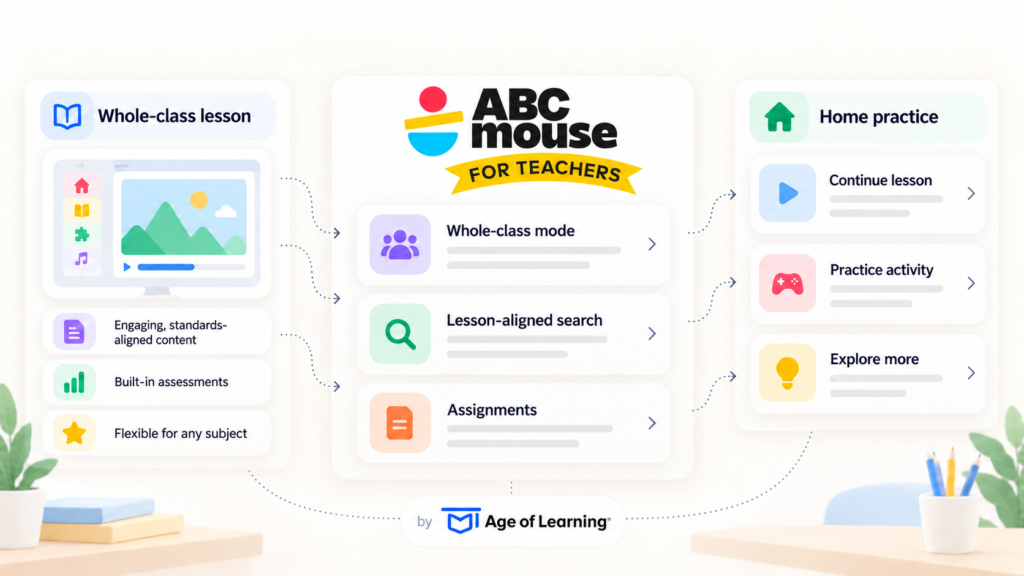
| TL;DR: A learning activity changes when a teacher leads an entire class through it. Teachers were already using ABCmouse this way, displaying activities and guiding group lessons. Age of Learning rebuilt its free teacher platform around that practice, adding a whole-class mode and tools for selecting activities that fit lessons. The activities teachers assign are also free for children to complete at home. The redesign gives teachers a larger role in connecting the company’s learning content across classroom instruction and home practice. |
When a child gets stuck on a learning activity at home, they can take more time or try again. Put that activity in front of a whole class, and the teacher has to decide whether to explain or move on.
Teachers were already doing this with ABCmouse, Age of Learning’s app for children ages 2 to 8. It teaches skills like reading and math through games and videos. Teachers projected its activities on a classroom screen and guided the group through them. An internal survey cited by the company found that 30% of responding teachers used it mainly for whole-class instruction.
In July, Age of Learning redesigned its free teacher platform, adding a dedicated whole-class mode. So, if teachers were already leading group lessons with ABCmouse, why did Age of Learning need to rebuild the experience for teachers?
Teachers Had Already Found a Classroom Role for ABCmouse
Teachers were already using ABCmouse with whole classes when Age of Learning started the redesign. ABCmouse is not the only recent product we have seen take its design cues from what users were already doing. In2ition AI said an insight from its early testers helped shape how Iris Listen was built.
Jennifer Reza, Director of Communications at Age of Learning, told SaaSTake:
The new whole-class mode is designed around how teachers were already using ABCmouse. In other words, that gave Age of Learning a clear idea of what the feature needed to do. Building from observed usage rather than an assumed workflow is also the idea behind data-driven product development, where teams use real user behavior to decide what to test and change next.
The update followed a redesign of the learner experience late in 2025, and after that, Age of Learning turned to teachers.
Teaching a Class is Different from Teaching One Child
A learning activity can stay the same while everything around it changes. In a classroom, the teacher decides when to pause, explain something again, or move on. The software needs to support each of those moments.
Pre-K classrooms already use shared screens for this kind of teaching. In a national RAND survey of public school pre-K teachers, 71% used interactive whiteboards daily or weekly. Only 23% said they used programs designed for individual learning that often.
Teachers in RAND’s focus groups worried that personal devices like tablets could take time away from building social skills. That concern, the researchers suggest, helps explain why group screens see far more use.
As per Reza, “Teachers aren’t managing one learner’s pace; they’re managing twenty or more at once, each at a different skill level.”
That, in turn, is the problem a whole-class mode is designed to address.
Finding the Right Activity is Part of Teaching
A whole-class mode makes it easier to use an activity with an entire class. However, before that, teachers need to find the right activity for the lesson.
That can be a challenge when teachers already use several types of classroom materials. A second RAND report from the same survey found 85% of pre-K teachers used multiple materials, averaging three. They combined commercial resources with materials they or other teachers created. Only about half said their materials were adequate for children with diverse learning needs.
So a new tool has to work alongside those resources, not replace them. ABCmouse addresses this by organizing its library around how teachers plan lessons. Teachers can look up activities that match a current lesson, then assign them to the whole class for school or home.
Reza said that structure saves teachers from sorting through 13,000 activities one by one. Instead, they work from the same categories they already use to plan a lesson.
That shift from browsing a large catalog to starting with what someone actually needs is showing up in other software too. We saw a similar change in how Shoppable is approaching AI shopping, where users describe the problem they want to solve rather than search through a catalog.
The redesign also lets teachers search content from My Math Academy and My Reading Academy by subject keyword or learning goal. This lets teachers connect each activity to what the class is already learning. So the redesign isn’t just about adding more content.
The Same Assignment Can Travel Home
What a teacher assigns in class doesn’t have to stay in the classroom. Students complete their assigned activity first, then explore the rest of ABCmouse freely. They can also access those assigned activities at home at no cost to their families.
That gives students a way to continue practicing at home. Instead of searching through the full library, families can start with activities the teacher has already chosen. At the same time, teachers can share a link that gives parents a discounted ABCmouse subscription.
Age of Learning has chosen to stay with children ages 2 to 8 rather than stretch into older grades. Reza adds:
ABCmouse is Moving to the Front of the Room
Age of Learning’s redesign gives teachers a larger role in how its content reaches children. Classroom assignments can draw on its school programs, and a separate discounted link introduces families to its paid subscription. Together, that connects classroom use with the family side of the business.
For ABCmouse, the classroom adds another test. After all, an activity must hold a child’s interest and give a teacher something to build a lesson around.