| TL;DR: Finishing an email design in Figma doesn’t make it ready to send. Retail teams often rebuild it in their email platform, add links, and check how it displays on phones and email apps. Listrak Studio converts prepared Figma designs into responsive HTML emails and saves them directly in Listrak. Designers and email marketers can then review links, layouts, and mobile previews before launching the campaign. For retailers sending frequent promotions, this could reduce the time spent recreating already-approved designs. |
Imagine a retailer preparing a weekend promotion. The designer finishes the email in Figma, and everyone signs off on the offer and the layout. Yet the campaign still can’t go out.
Someone has to turn that design into a working email, transfer its images, add links, and check how it looks on different screens. The designer may be done, but for whoever builds the email, the work is just starting.
Listrak Studio, announced in September 2026, aims to remove this manual step. For retailers considering an email marketing platform with Figma integration, the question is how much of the production work Studio can eliminate between design approval and campaign launch.
Faster Production Has Become a Business Priority
Retail marketers have a strong reason to care. Gartner’s 2026 benchmarks found that nearly half of retail CMOs don’t think they have the budget to carry out their marketing strategy. With budgets under pressure, spending hours recreating already-approved work becomes harder to justify.
The time needed to produce marketing emails has also started to come down. Really Good Emails’ 2026 survey put the average time to produce an email at 5.90 days, down from 8.21 days in 2025. Large companies still took 2.4 times as long as small ones. The survey also found that more extensive approval processes were associated with longer production times.
Even so, producing an email still takes close to a week. Listrak Studio targets one part of that process: converting an approved design into a working email. Other marketing platforms are automating later parts of that workflow too. For instance, Phave uses AI to decide which approved email a prospect should receive next and when.
Listrak’s broader platform helps retailers personalize marketing across email, SMS, and other channels. Studio extends those capabilities into Figma, allowing designers to move approved email designs directly into Listrak.
An Email Design Needs More Than an Image Export
Retailers looking for an email platform that turns Figma designs into ready-to-send emails now have that option inside Listrak. But the real difference lies in how much of the design actually makes it across.
After all, exporting a design as images only covers part of the job. The text, buttons, links, and layout still have to become a message that email apps can display. It also needs to adjust to smaller screens without disrupting the layout.
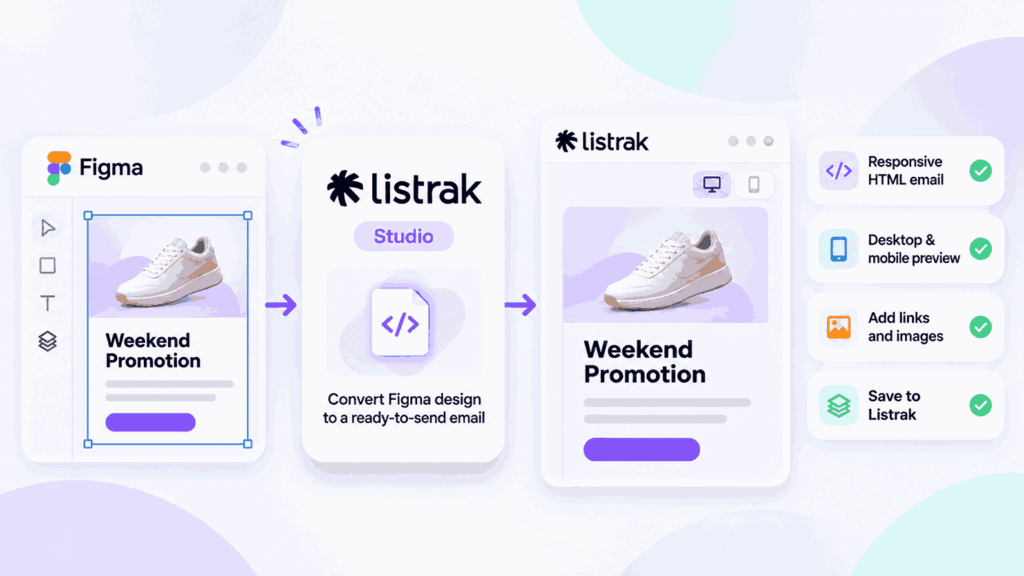
Listrak describes Studio as a Figma-to-HTML email plugin. It converts designs into responsive HTML emails and saves the finished message, along with its images, directly to the user’s Listrak account. That generated code uses an email framework Listrak has refined for more than a decade, with layouts and code designed to support email clients such as Outlook and Gmail.
Studio also works as a responsive email builder for retailers that need repeating product sections in cart and order emails. A designer tags one item layout, and the email repeats it for every product in a customer’s cart or order.
Ross Kramer, Listrak’s co-founder and CEO, said Studio eliminates “rebuilding, copy-pasting and waiting on developers to translate designs into HTML.” For marketing teams, this means less time spent recreating approved designs and fewer handoffs between designers and email developers.
From Approved Design to Saved Message
The Figma-to-email workflow runs in four stages, which Listrak calls Setup, Generate, Polish, and Publish.
In Setup, users assign tags to individual design elements so Studio can identify how each should function. Buttons, images, navigation links, and reusable sections all need the appropriate tags.
In Generate, Studio creates the email HTML and processes the fonts. Users can also add destination URLs for individual links. Polish then shows desktop and mobile previews, so users can check and edit the email before publishing.
RSVPify follows a similar review-before-publish workflow for event emails and pages, letting organizers check AI-prepared content before it goes live.
Once these checks are complete, users can publish it directly to their Listrak account. The finished email is saved as a message in Listrak, ready to attach to a campaign. From there, the work shifts from building the email to running the campaign. AI email marketing tools can help with tasks such as audience selection, testing, and send timing.
Users still have to initiate the campaign separately, giving them an opportunity to review the message before it reaches customers.
Why the Inbox Still Shapes the Design
An email that looks right in Figma can still render differently once a customer opens it. Its layout must work across the email clients and devices customers use.
Gmail clipping is one example. Gmail hides part of any message larger than 102KB behind a link. That limit counts the email’s code and tracking, not just the words a reader sees. This means an email’s underlying code can determine whether customers see the entire message or only part of it.
Studio flags emails that risk Gmail clipping or exceed the supported height limits on iPhones. Its mobile controls also let users adjust alignment and choose which elements appear on desktop or mobile. That way, retailers get an opportunity to correct rendering issues before sending a campaign.
For the weekend promotion, this could mean checking whether product columns stack neatly on mobile screens and whether the promotional button remains easy to find.
The Integration Still Needs a Prepared Design
Removing the manual rebuild doesn’t eliminate the preparation required before conversion. Buyers should understand what their existing Figma files need before using Studio.
It uses Figma Auto Layout to understand how elements are spaced, aligned, and arranged. Existing files that don’t use it may need adjustments before conversion. Older files without Auto Layout may need to be adjusted first. Listrak says its built-in converter can handle many straightforward changes without altering the original design’s appearance.
The Figma email integration still depends on correctly tagged elements and accurate links, fonts, images, and content settings. Changes made in Figma don’t automatically carry over to Studio. Users must regenerate the email to include the latest design updates. When users publish the revised email, Studio updates the existing saved message in Listrak rather than creating a separate one.
Where Retail Teams Could See the Benefit
Studio is likely to be most useful for retailers that design emails in Figma and run frequent campaigns. The fit is strongest when they still rely on manual conversion after design approval.
For retailers evaluating the platform, an existing campaign offers a practical way to test the integration. This can help them assess how much preparation their designs need and which elements require manual correction. It also shows how much production time the plugin saves. Studio is included at no additional cost for current Listrak clients.
Listrak estimates potential savings of over 250 hours a year in email build time. Ultimately, time spent recreating an approved layout could instead go toward testing an offer or refining what customers receive.